
Run a node
Linux: paste in a terminal
curl -fsSL https://aisathome.org/node.sh | sh- Downloads the latest release from GitHub and checks it against its SHA-256 sums.
- Checks your driver, card and disk, says what it will install, and asks before it changes anything (it needs sudo).
- Installs the node and the model for your card (13-14 GB), tests its speed, and starts on science work.
Windows 10 or 11
Download for WindowsOn the setup page, choose Start without an account (science only), or link it to your account right away. Windows may warn “unknown publisher” (not signed yet): More info → Run anyway. Windows install in detail
Other ways: build llama.cpp yourself · what a release contains · the bundle step by step
A node is a computer with a strong NVIDIA GPU that runs the network’s open-weight model, Qwen3.8 27B. It connects outward to the AIs@home gateway and works on what it is sent: science tasks such as prove2me proofs and, once you link it to an account, people’s chats and API requests.
Running a node is voluntary and unpaid: no token, no payment. A linked node earns credit in BOINC’s unit, which is recognition, not money.
What you need
Section titled “What you need”- An NVIDIA GPU with 24 GB or more (RTX 3090, 4090, 5090 class), or 16 GB (RTX 4080, 5070 Ti, 5080 class) with at most a light desktop on it. Slower 16 GB cards (RTX 4060 Ti, 5060 Ti) fail the installer’s speed test.
- Linux (x86_64, systemd; Ubuntu 22.04, Debian 12 or newer) or Windows 10 or 11, a current NVIDIA driver, and about 18 GB of free disk.
- You must be 18 or older. Running a node means you accept the terms; the installers ask you to confirm.
All requirements
| Linux | Windows | |
|---|---|---|
| GPU | NVIDIA RTX 30, 40 or 50, 16 GB or more | the same |
| Driver | 525.60.13 or newer (570.26 for an RTX 50) | 527.41 or newer (570.65 for an RTX 50) |
| System | x86_64 with systemd, glibc 2.35 or newer | Windows 10 or 11, 64-bit |
| Disk | about 17 GB on 16 GB cards, 18 GB on 24 GB cards (the faster mode’s 1.4 GB draft model), in /var/lib |
about 17 GB on the system drive |
| Speed | at least 20 tokens/s after a 32,000-token prompt (the installer tests it) | the same |
nvidia-smi must work. On a 16 GB card the desktop and other programs may use about 1.5 GB of its
memory. Why each one: requirements and why. The two model
settings: model settings.
Your node’s own page
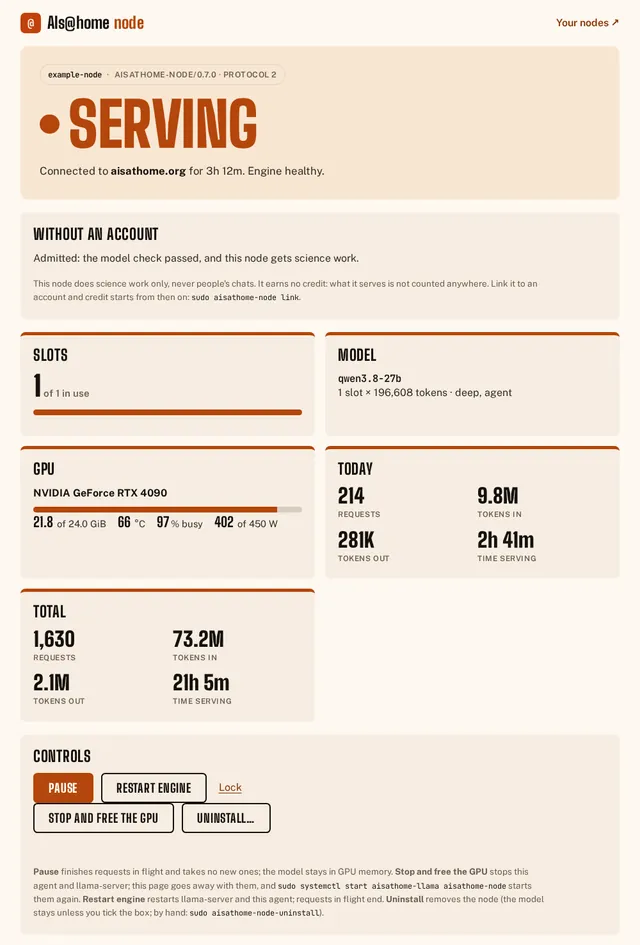
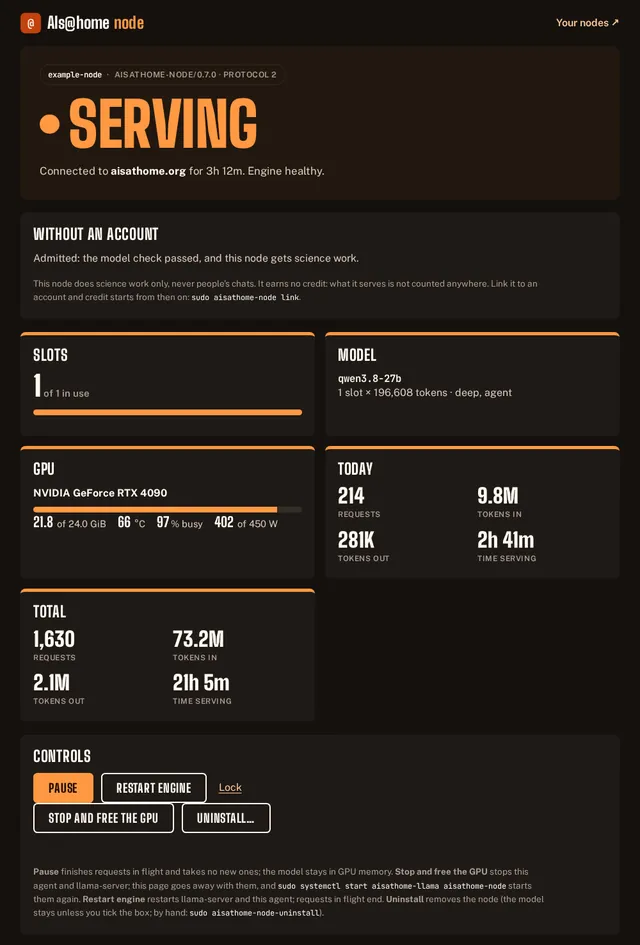
Section titled “Your node’s own page”Once it runs, the node has a page on your computer at http://127.0.0.1:7381/. Windows opens it. On Linux the installer prints the address, and desktops get an “AIs@home node” menu entry. The page shows whether the node is serving, its GPU and what it served, never prompts or answers. Behind a local password it can pause the node and restart the engine; on Linux also stop the node and free the GPU, or uninstall it, and on Windows stop and start the engine.
To stop, update or remove a node: Day to day.
Link it to an account
Section titled “Link it to an account”A node without an account does science work only, never people’s chats, and earns no credit. Linked to your account, it answers chats too and earns credit from then on.
- Linux:
sudo aisathome-node link - Windows: Link to my account on the node’s page
The node shows a link and a code. Open the link on any device, sign in with GitHub or Google, check that the page shows the same code, and approve. Then, under Your nodes on your account page, press This is my machine on the node. Until you do, it is not one of your own nodes and gets none of your personal data.
Only approve a code that a machine of yours shows you. A code someone sends you would add their machine to your account.
Approving means you accept the operator terms (§6). Science only on my nodes on the account page turns chats off for all your nodes. An account can have up to 10 nodes, at most 10 of them connected from one internet address. The network takes 25 nodes with an account and 25 without one for now; the installer or the approval page says so when it is full. A node without an account that is not seen for 90 days is deleted.
Installing by hand on Linux, you can link at the install instead: see Install on Linux.
How the node runs
Section titled “How the node runs”- No open ports. The node only dials out; nothing listens on your network.
- Sandboxed. On Linux the node agent runs as the unprivileged user
aisathomeand the engine (llama-server) as its own user,aisathome-llama: no access to/home, a read-only system, no new privileges. On Windows the node runs as a service of its own. - Fewer traces on disk. No core dumps, no swap for the services, a bounded prompt cache in RAM, no prompt logging. Hardened, not confidential: see privacy hardening.
- Anonymous requests. Your node never learns who sent a request.
- Faster on 24 GB cards with the Linux installer. After its checks, the installer turns on speculative decoding with the model’s own multi-token-prediction head (MTP): the node drafts a few tokens ahead and checks them, which writes about 1.7-1.9x faster with the model’s own output (the model check passes with it). It needs 21,000 MiB free on the card; without the room the node runs without it and the installer says why. The Windows node leaves it off. More: model settings.
- Starting at boot. The Windows node starts by itself. On Linux the installer’s last lines say
whether the node starts at boot;
sudo systemctl enable aisathome-llama aisathome-nodeturns it on, anddisableturns it off. - Removing it. On Linux, Uninstall… on the node’s page or
sudo aisathome-node-uninstall(installed at/usr/local/sbin/aisathome-node-uninstall, so it works after the download folder is gone); both keep the model unless you ask. On Windows, Settings → Apps. Stop, start, remove.
How new nodes start
Section titled “How new nodes start”- A node first answers a few test prompts and gets work once they pass. Its page and
aisathome-node statussay where it stands. - A new node serves requests from day one. Requests with tools (agents such as opencode) reach it only from users who allow volunteer nodes for agents.
- The gateway checks the tool calls in answers for crude attacks (download and run, credential files, encoded commands, file uploads). From a node without an account such a call is stopped and the node is held until we look; from a linked node it is flagged. These are tripwires, not proof that an answer is honest: the people who run agents still approve each command themselves. A node is also held when it fails the model check; its page or the account page shows that.
- No single volunteer gets more than about a third of the conversations while others are free.
- A linked node earns credit, except for requests you send yourself.
What you are responsible for
Section titled “What you are responsible for”- Your machine, its power bill and its other GPU work (BOINC, games). The node uses the GPU fully while it serves.
- Not looking at what you serve: don’t log, store, copy or inspect prompts or answers, and don’t tamper with them. This is a promise to users; see the terms.
- Keeping your node token secret (the node keeps it in a file only administrators can read), and telling us if it leaks.
What has been tested so far: About the binaries. Tell us what worked for you: contact@aisathome.org.
Next: Day to day · Update your node · Latest from the dev log